


DIHOOM
3.912.00 Reviews
App Specs
- Version
- 4.11.5.9
- Updated On
- License
- Free
- Downloads
- 10,000+
- Developer
- Leap_Forward
- Categories
- Libraries & Demo
- Platform
- Android, iOS
Screenshots

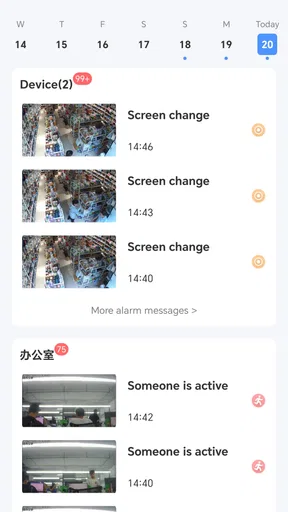
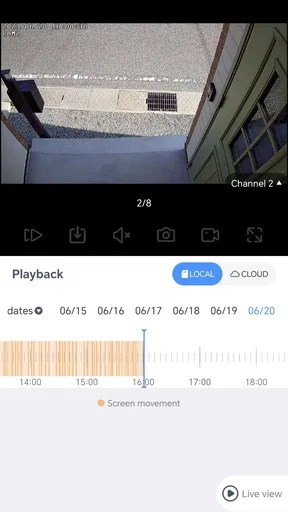
 Analysis by AppCompare
DIHOOM is best approached as a focused security-monitoring app, not as an all-purpose digital companion. I would consider it when I want a way to keep an eye on a security setup from my phone, rather than another place to manage tasks, social updates, or a calendar. That distinction matters: monitoring is useful when it helps me check a situation quickly, but it is not the same thing as having a complete security system or replacing the equipment and services a home or business may need.
Why the monitoring role matters
In the broad Libraries & Demo area, DIHOOM has a more specific job than a general-purpose utility. Its central promise is security monitoring, so the value I would look for is a clear route from opening the app to understanding what is happening. A monitoring app earns its place when it reduces uncertainty at the moment I need to check in, not simply because it has a long list of options.
That also sets a sensible expectation before installing it. I would not choose DIHOOM expecting task lists, social-network tools, or calendar syncing; those functions are not the reason to consider it. Instead, I would first ask whether I already have a compatible security arrangement and whether I want to consult it through a phone. If the answer is yes, a dedicated app can be more convenient than repeatedly finding a separate screen or relying on occasional manual checks.
The app is free, has an Everyone age rating, and is developed by Leap_Forward. It has a 3.8 average from around two dozen ratings, with more than ten thousand installs. I treat those figures as context rather than proof that the app will suit every setup: security tools are especially dependent on the hardware and routine they are meant to support. The practical question is whether it fits the system I actually use.
What a useful check-in looks like
For this kind of app, the simplest workflow is often the most important. I want to open it with a specific question in mind—whether a monitored space needs attention, for example—and be able to orient myself without hunting around. That is a better test than tapping through every screen once. A security tool is something I may use briefly, between other tasks, so clarity and a predictable path matter more than novelty.
I would make the first session a deliberate setup check rather than waiting until I am away from home or in a hurry. Confirm that the app is connected to the intended environment, learn where the relevant monitoring view is, and check what the app displays when everything is ordinary. Knowing the normal state gives me a useful reference point later. It also helps separate an actual change from a screen or connection issue.
One useful habit is to decide in advance what would prompt a follow-up action. A phone-based check can help me decide whether to investigate, contact someone nearby, or simply carry on, but it should not become a substitute for a response plan. I would keep the app as one part of that routine, alongside whatever physical safeguards and trusted contacts make sense for the place being monitored.
Worth Reading Before You Choose

Flipboard Shows What News Apps Must Do Beyond the Feed

Switching to Android Auto Means Rethinking Your Driving Routine

Google Calendar Makes a Crowded Week Easier to Manage

Ludo King Makes the Most of the Minutes Between Plans

Baby Panda World Brings Quick Play to Modern Phones, but Its Game Library Feels Busy

ESPN’s Live Game View Makes Following Close Games Easier
A realistic place in an everyday routine
Imagine leaving home for the day and later realizing that I cannot remember whether everything was settled before I left. A monitoring app is most helpful in that ordinary moment if it lets me check with little fuss and then return to what I was doing. The benefit is not dramatic; it is the small reduction in doubt. The same pattern could matter to someone checking a space they are responsible for while working elsewhere, provided their setup supports that use.
I would avoid turning that convenience into constant checking. Frequent peeking can create worry without adding useful information, especially if I do not know what a normal status looks like or what action a change calls for. A more thoughtful routine is to check at meaningful points—before leaving, after a relevant alert or concern, or when responsibility for the space changes hands—rather than treating the app like a live feed to watch all day.
For shared spaces, it is worth agreeing on who checks and what happens next. If several people assume someone else is watching, the app may create a false sense of coverage. A simple handoff—who is responsible, when they will check, and whom they will contact if something looks wrong—can make a monitoring tool more useful than adding more people who all receive the same information without a plan.
Where it differs from broader alternatives
Compared with a general smart-home dashboard, a focused monitoring app can be easier to approach if security is the only thing I need to check. A broad dashboard may be preferable when I want lighting, climate, entertainment, and security in one place. The trade-off is straightforward: one app can reduce switching, while a specialized one may keep its main purpose easier to find. I would choose based on the routine I want, not on which app sounds more comprehensive.
It also differs from relying on a device’s own controls or a manual check. Physical inspection can answer questions that a phone screen cannot, while a monitoring app can be more convenient when I am somewhere else. Neither is a universal replacement for the other. If I need a monitored environment to work through an unreliable connection or require a formal response service, I should evaluate those requirements directly rather than assuming that an app alone supplies them.
That is the main trade-off I see: convenience is valuable, but it depends on the full setup. Before making DIHOOM part of an important routine, I would confirm that it works with the equipment I intend to use and test the steps I would rely on. If I want a broader smart-home hub or a service with clearly defined professional response arrangements, an alternative built around those needs may be a better fit.
A First Look at DIHOOM
When I first installed DIHOOM, the interface caught my eye immediately. It’s clean, intuitive, and just plain pleasant to look at. The developers have done a fantastic job in ensuring that everything is where you’d logically expect it to be, so you’re not left scratching your head trying to find a feature. For someone who appreciates a no-nonsense design, this was a big win.
Features That Stand Out
The real magic of DIHOOM lies in its features. It offers a suite of tools that are designed to make life easier. Whether you’re looking to organize your day with a to-do list or keep track of important dates with a calendar, DIHOOM has got you covered. Here’s a breakdown of some of the features that I found particularly useful:
- Task Management: This feature lets you create, edit, and prioritize tasks. You can set deadlines and even reminders, which is perfect for keeping on top of things.
- Social Connectivity: DIHOOM integrates seamlessly with your social networks, allowing you to share updates and connect with friends without hopping between apps.
- Notes and Memos: I’m a sucker for jotting down quick notes, and DIHOOM’s note-taking feature is a lifesaver. It’s simple but effective, letting you capture thoughts on the go.
How DIHOOM Fits Into Daily Life
Using DIHOOM for a week made me realize how much I relied on it. It became my go-to app in the morning when I planned my day, and by evening, it helped me reflect on what I’d accomplished. The app’s notification system is subtle yet effective, ensuring I never missed a beat without being intrusive.
I also loved how DIHOOM’s calendar feature synced with my existing schedules. It pulled in events from my other apps, making it a one-stop-shop for all my scheduling needs. Honestly, it was like having a personal assistant in my pocket.
Room for Improvement?
While DIHOOM is packed with features, I did notice a couple of areas that could use a little polish. For instance, the initial setup requires granting quite a few permissions, which might be off-putting for some users concerned about privacy.
Moreover, while the app runs smoothly most of the time, there were occasional lags when switching between features. It's nothing too serious, but it’s something the developers might want to iron out in future updates.
The Final Verdict
All in all, DIHOOM is a versatile app that can easily become an integral part of your daily routine. Its comprehensive features cater to a wide range of needs, from task management to social connectivity. Despite a few hiccups, the app delivers on its promise to help you manage your life more efficiently.
If you’re on the lookout for an app that combines functionality with ease of use, give DIHOOM a try. It might just be the digital sidekick you’ve been searching for!
Choosing it for the right reason
There is a mismatch between the focused security-monitoring role I would expect from DIHOOM and the broader productivity features described in the older account above. I would not rely on those task, social, note, calendar, or notification claims as a reason to install it. For a security decision, the dependable starting point is its stated monitoring purpose and a direct check that it works with the equipment and setup I plan to use.
That is also why I would not judge it by how many unrelated tools appear in a feature list. The useful question is narrower: can I access the monitoring information I need, understand what I am seeing, and take an appropriate next step? If the app helps with that, its focused role may suit me better than a crowded all-in-one dashboard. If it does not fit my equipment or leaves me unsure what a status means, a different app designed for that system is the more practical choice.
Before making it part of a routine
Because security checks can influence real decisions, I would try the app in low-pressure conditions first. I would learn the normal way it presents the monitored space, then repeat the check from the place where I expect to use it. I would also make sure anyone else sharing responsibility understands the same basic workflow. These small steps are more valuable than assuming that installation alone creates reliable coverage.
Readers may reasonably wonder whether DIHOOM is suitable for a particular camera or security device, whether it can replace a provider’s own app, or whether it works as a complete security service. Those questions depend on the system and the job expected of it, so I would verify compatibility and responsibility before relying on it. In general, a monitoring interface should be treated as one part of a setup, not as proof that a space is protected or that help will automatically arrive.
On Android, the listed minimum operating-system requirement is version 6.0, and the current version is 4.9.7.9. I would still check the app’s behavior on the device I intend to use, especially if that phone is older or will be a shared household device. The release date is June 20, 2023; for me, the practical consideration is less the date itself than whether the current app and my security equipment work together smoothly.
My recommendation
I would recommend DIHOOM to someone who specifically wants a phone-based way to check a security setup and is willing to confirm compatibility before depending on it. Its free price makes trying it straightforward, but free does not remove the need to think through the system around it. Keep a separate response plan, agree on who is responsible for checks, and do not treat a quick glance at a phone as a substitute for physical safeguards.
I would skip it if I were mainly looking for a planner, a social hub, a note-taking tool, or a broad smart-home controller; those goals call for a different kind of app. I would also choose another option if I needed a clearly defined monitoring service or confirmed support for specific equipment that DIHOOM cannot provide in my setup. For the right user, its appeal is simple: a focused way to check in, used with sensible expectations rather than as a promise of complete security.
Pros
- User-friendly interface for easy navigation.
- Wide variety of customization options available.
- Regular updates improve app stability.
- Seamless integration with other smart devices.
- Efficient customer support and response time.
Cons
- Limited compatibility with older devices.
- Occasional connectivity issues reported.
- Premium features locked behind paywall.
- Initial setup can be confusing for some users.
- Battery consumption is higher than expected.
FAQs for DIHOOM
What is DIHOOM and what does it offer?
DIHOOM is a versatile application designed to enhance your productivity and lifestyle through a range of features. It offers task management, calendar integration, and personalized reminders. Additionally, DIHOOM includes wellness tracking and social connectivity options, making it a comprehensive tool for both personal and professional use.
Is DIHOOM available on both Android and iOS platforms?
Yes, DIHOOM is available for download on both Android and iOS platforms. You can find it on the Google Play Store for Android devices and the Apple App Store for iOS devices. Ensure your device meets the minimum system requirements for the best experience.
Does DIHOOM require a subscription or is it free to use?
DIHOOM offers a free version with basic features, allowing users to explore its core functionalities without any cost. For those seeking advanced features and an ad-free experience, DIHOOM provides a premium subscription option, which is available at a competitive rate.
How does DIHOOM handle user data and privacy?
DIHOOM places a strong emphasis on user privacy and data security. It adheres to strict privacy policies and employs encryption to protect user information. Users have control over their data and can adjust privacy settings within the app to suit their preferences.
What are the unique features that set DIHOOM apart from other apps?
DIHOOM stands out with its unique blend of productivity tools and wellness features. It integrates seamlessly with other apps, offers AI-driven insights for task optimization, and includes a community feature for social interaction. Its user-friendly interface and customizable options further enhance its appeal.


